Local Stock Guide
Local Pokemon Card Restock Tracker: Find Nearby Stock
For collectors deciding which nearby stores are worth checking
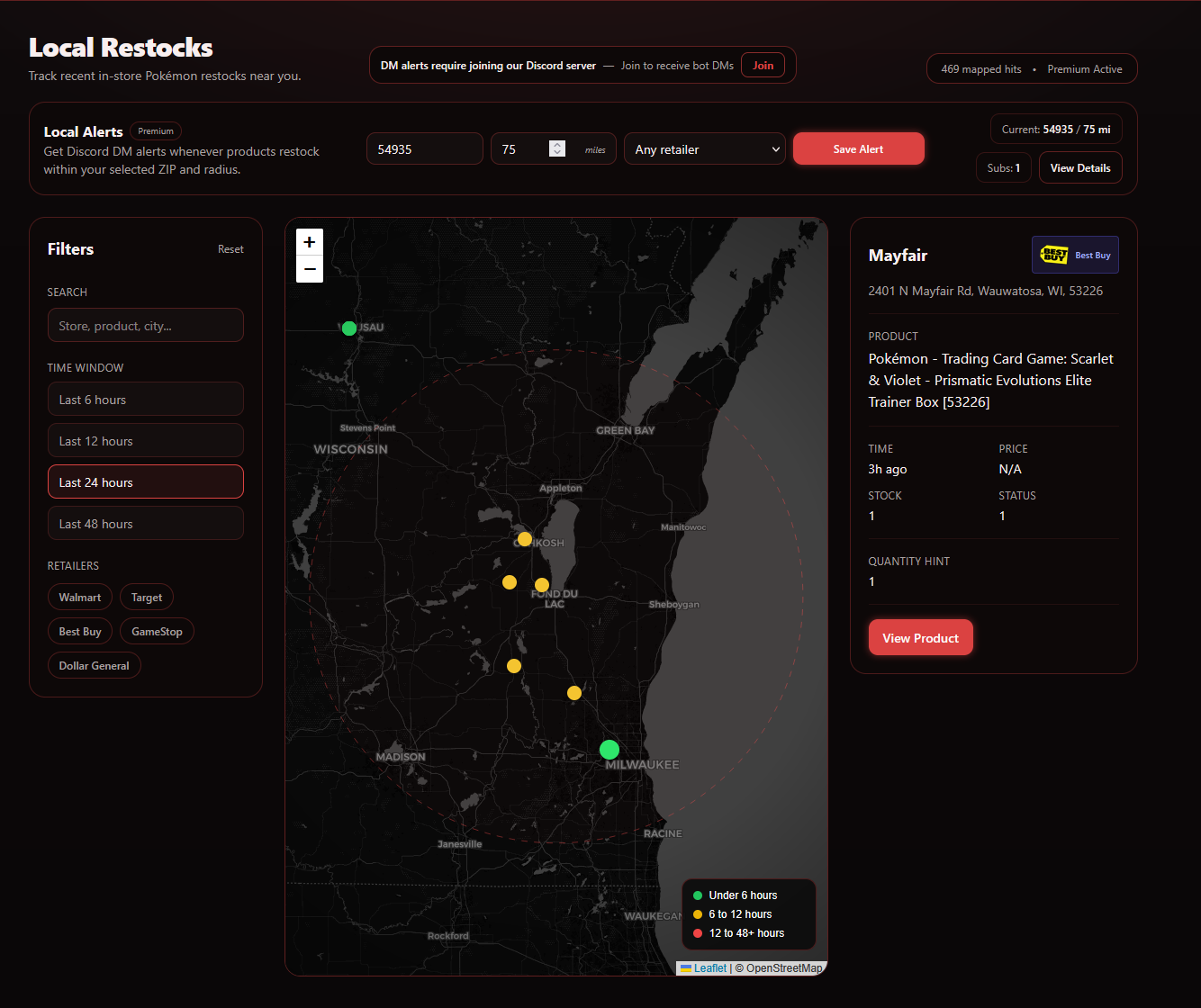
DropNotify turns nearby Pokemon and TCG inventory updates into a searchable map, feed, and mobile alerts. It helps you compare stores before making a trip, while showing the location and timestamp you need to judge whether the inventory may still be current.
Quick answer
Open the DropNotify local restock map, choose your location and driving radius, then filter to the retailers and products you want. Check the store and timestamp before traveling because local inventory can sell or update after an alert. DropNotify helps you choose where to look; it does not reserve shelf stock.
What the DropNotify local map shows
DropNotify shows the store, address, retailer, product, approximate distance, and time of the latest inventory update. Use those details to compare nearby options instead of checking stores at random.
The map cannot see every cart, hold, unstocked case, misplaced item, or delay in a retailer's inventory system. Even an accurate update can become stale while you are traveling.
Check recency before distance
The nearest DropNotify result is not always the best one. Compare when each update occurred, how far away the store is, and whether the product is clearly identified. A recent update slightly farther away may be more useful than an old one around the corner.
- Filter out retailers you do not plan to visit.
- Use product search or SKU subscriptions for high-priority items.
- Use a time window that matches how quickly you could reach the store.
Set alerts for stores you would visit
Set DropNotify local alerts around trips you already expect to make: before work, near errands, or when passing a group of stores. This reduces unnecessary travel and makes time-sensitive inventory data more useful.
The public map lets you explore recent activity. DropNotify member tools add configurable location, radius, retailer, time, and product filters with mobile notifications.
Practical setup
A four-step workflow
Set your DropNotify location
Use your current area or a ZIP code near stores you can realistically visit.
Choose a radius
Begin small, then expand only if nearby inventory results are too limited.
Filter stores and products
Keep the DropNotify map focused on retailers and inventory that match your collecting goals.
Check the timestamp
Compare the time, distance, store, and exact product before changing your plans.
Common questions
What collectors should know
Is local Pokemon inventory guaranteed?
No. DropNotify reports recent inventory updates, but it cannot reserve stock or account for every sale, hold, stocking delay, or data lag.
How large should my alert radius be?
Use the smallest radius that includes stores you would realistically visit. Expanding it increases coverage but can reduce the relevance of each notification.
Can I search for one local product?
Yes. Product search and SKU-focused alerts are useful when broad retailer inventory would create too much noise.
Continue researching
Related collector guides
Target Pokemon Card Restock Alerts: Online and Local
Track Target.com drops and nearby inventory with DropNotify retailer alerts, SKU subscriptions, and local tools.
Read guideRetailer GuideCostco Pokemon Card Restock Alerts: Online and Warehouse
Use DropNotify to track Costco Pokemon bundles online and at nearby warehouse locations.
Read guideApp Selection GuideHow to Choose the Best Pokemon Restock Alert App
See how the DropNotify app handles mobile alerts, local stock, SKU subscriptions, history, and filters.
Read guideFind nearby restocks with DropNotify
Explore the public map, then use the app for configurable local stock notifications and filters.